
Located in Plano and Forney, TexasHeading
Patient Portal Instructions
Reveal Radiant, Rejuvenated Skin
Instructions on how to access your patient portal:
1. You will get a link emailed to you immediately after the Evolve Dermatology office staff activate your portal.
2. Follow the instructions detailed in the email.
3. Note: The link will expire after 48 hours. If the link has expired, please call the office to have a new link sent to you.
4. Click here to go to the Patient Portal Login screen to access the patient portal login. Please make sure to use Google Chrome or Mozilla Firefox.
5. Enter the login credentials that were provided in your activation email.
6. Congrats! You should be logged in!
7. If you need to change your password, select “Forgot password” and change your password as prompted. Your screen should look as follows:
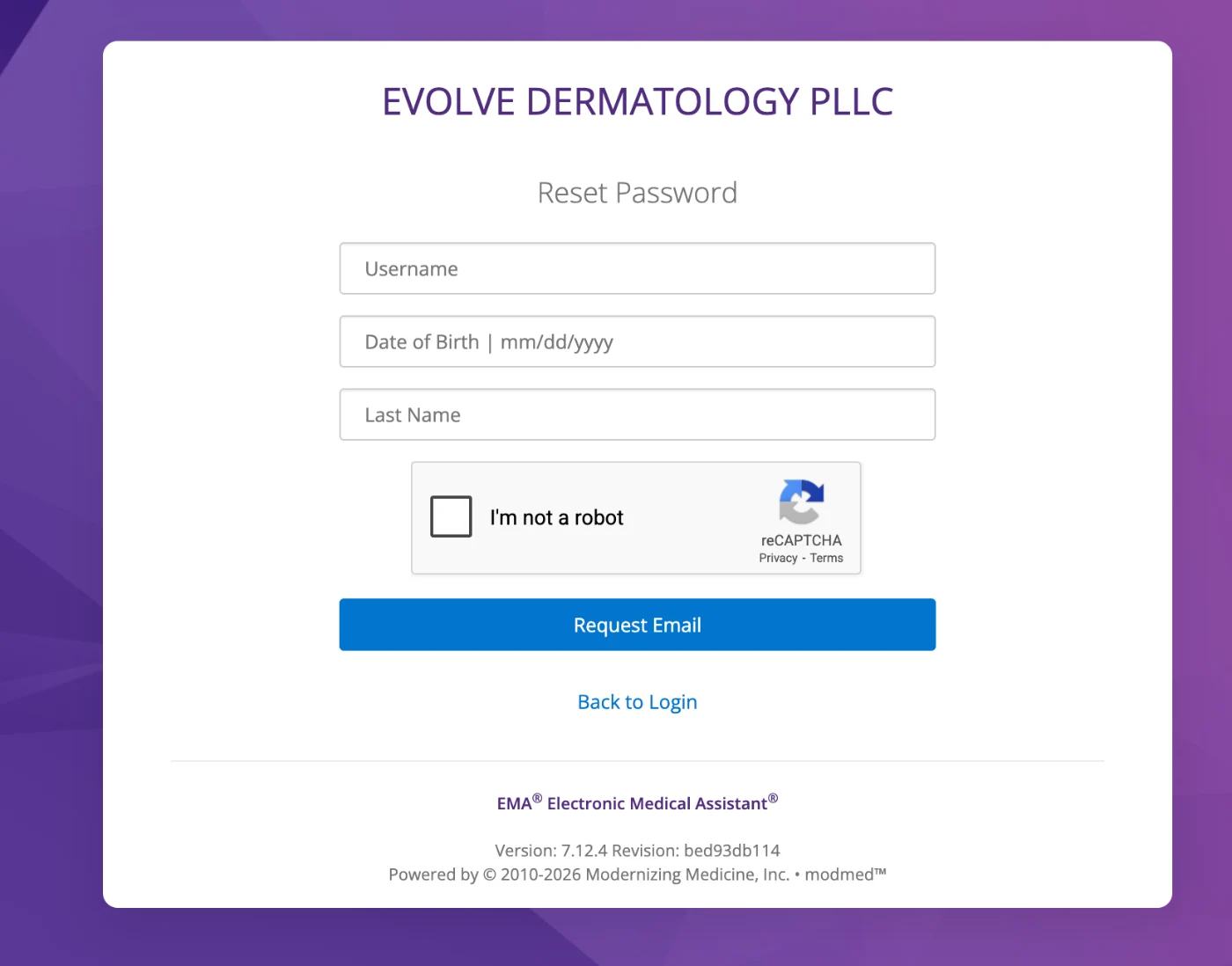
8. Click on “Request Email” and check your email to change your password.
9. Login with your new password. Congratulations! You should now be in your patient portal!
Meet Our Doctors
At Evolve Dermatology, our team of dedicated dermatologists combines expertise with a compassionate approach to provide you with the best possible care for your skin health. Our team is dedicated to staying at the forefront of advancements in dermatology to ensure our patients receive the highest quality of care tailored to their unique needs. Get to know our experienced doctors here.